Sac Film & Music Festival 10x10 Filmmaker's Challenge
Inc. Magazine "America’s 5000 Fastest Growing Companies"
Two-Time Recipient • Awarded 2008 & 2009
Sacramento Business Journal "100 Fastest Growing Companies"
Three-Time Recipient • Awarded 2007-2009
Law & Order National Design Excellence Award
Best Law Enforcement Website - Law & Order Magazine
Frequently Asked Questions
I hold four degrees, with my primary educational focus in applied computing, which emphasized methods of working with computer-generated graphics and visual art.
Bachelor of Science, Applied Computing, Telecommunications, and Multimedia California State University, Monterey Bay • Marina, CA
Associate of Arts, University Studies – Psychology Emphasis Monterey Peninsula College • Monterey, CA
Associate of Science, Administration of Justice Monterey Peninsula College • Monterey, CA
Associate of Arts, General Studies Monterey Peninsula College • Monterey, CA
I didn't go to film school. I originally approached filmmaking from a business perspective and gradually transitioned into cinematography as opportunities to work behind the camera became available.
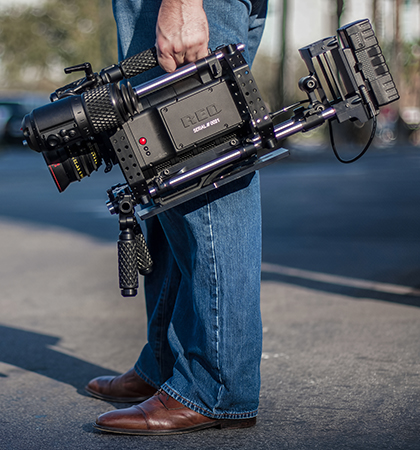
Since then, I've been able to work on some great camera platforms, including:
• RED EPIC Mysterium-X 5K
• RED ONE MX 4K
• Blackmagic Design Pocket Cinema 6K G2
• Blackmagic Design Studio Camera 4K
• Hasselblad H4D-60 Medium-Format
• Sony PMW-EX1 Broadcast
• Nikon D5200 DSLR
The majority of my Instagram work is shot on the Apple iOS platform, and my preferred mobile editing app is Snapseed by Google.
Social media is an invaluable resource for artists. It allows you to express yourself to an almost infinite audience, build a following, and even monetize your work.
That said, I’m probably more selective about what I post than most artists. There have been times when I’ve gone nearly two years between posts.
You never really know what will resonate with your audience, so don’t be afraid to experiment with your work.
I have extensive experience using Grok and ChatGPT for general-purpose, AI-supported work. I’ve found these platforms invaluable for research, proofreading, HTML revisions, and developing ideas for marketing copy.
I’ve used the following tools for visual, audio, and graphic design support:
You can capture everything properly (and fix the rest in post) as long as you frame your composition well, ensure good lighting, and keep your subject in focus. Also, shoot at the highest resolution possible.
Unless you’re in journalism, edit everything. You’d be surprised how much an “average” photo can shine with a little post work.
• Adobe Photoshop – image editing • Adobe Lightroom – photo correction and cataloging • Adobe Illustrator – illustration and vector graphics • Snapseed (Google) – iOS photo editing • Adobe Firefly – AI image repair and generation • Hasselblad Phocus – RAW file management for H-series cameras • Topaz Gigapixel AI – image upscaling • Topaz Photo AI – image processing • Apple Keynote – presentation graphics • Microsoft PowerPoint – presentation graphics • Canva – quick layout and mockups
• Adobe Premiere Pro – editing primary • Adobe After Effects – motion graphics, visual effects • Blackmagic DaVinci Resolve – color grading and correction • Topaz Video AI – upscaling and clarity restoration • Adobe Audition – audio repair and mixing
• Apple Final Cut Pro – video editing and motion graphics